
Train food doesn’t have to mean settling for limited pantry options. If you’re craving a Domino’s pizza during your journey, you can have it delivered directly to your seat at selected railway stations. Whether you’re travelling overnight or taking a short intercity trip, ordering your favourite pizza is now a simple part of the journey.
This guide explains how to order Domino’s pizza on a train using the IRCTC Food on Track platform or the Domino’s app. You’ll also learn about station availability, payment options, the delivery process, and a few practical tips to help your order arrive smoothly.
| How Can You Order Domino’s Pizza on a Train: Quick Answer
You can order Domino’s pizza on a train through IRCTC’s Food on Track app or the Domino’s app. Enter your PNR number, select an upcoming station where Domino’s delivers, choose your pizza, and pay online or via cash on delivery. Orders must be placed 2 hours before arrival. |
Want To Save More On Domino’s? Check Out The Latest Deals Here!
Advantages of Ordering Pizza During Your Train Journey
Ordering pizza on your train journey comes with real perks:
- Convenience: Your pizza arrives straight at your seat, so there’s no need to step off at stations or hunt for restaurants during stopovers.
- Hygienic and fresh: Domino’s prepares and packages every order to standard, which matters most on longer journeys.
- Customisable: Choose your own toppings, crust, and size, so your pizza suits your taste exactly.
Methods To Get Your Domino’s Pizza Delivered on a Train
Ordering Domino’s on a train is simple. Whether you’re travelling overnight or taking a short trip, you can have your favourite pizza delivered to your seat at selected railway stations. Before getting into the ordering steps, here are some of the most popular pizzas available for train delivery.
Domino’s serves a wide selection of vegetarian and non-vegetarian pizzas at stations where train delivery is available. Some popular picks include:
- Onion Pizza
- Paneer Makhani Pizza
- Margherita Pizza
- Chicken Pepperoni Pizza
- Classic Chicken Pizza
You can place your order through the IRCTC website or app, the Food on Track app, or directly from the Domino’s app using its dedicated train delivery feature. All three platforms let you schedule your order for delivery at supported railway stations, making it easy to enjoy a hot meal during your journey.
While Domino’s is one of the most popular choices, it may not be available at every station or on every route. Explore other apps that help you order food on trains if you want access to more restaurant brands, regional cuisines, or additional delivery options during your journey.
How to Order Domino’s Pizza on Train Via IRCTC App/Website and Food on Track App
Indian Railways has been improving its services over the years. Whether it is an online ticket or food booking, it has implemented several technologies to improve the overall experience. Coming to ordering your pizza from Domino’s and getting it delivered to your train, you can follow the steps below.
Visit IRCTC or Food on Track App/Website: You need to visit the official website/app of IRCTC and log in to your account using the necessary credentials. Once you click on the “E-Catering” option, the website will be redirected to IRCTC eCatering’s Food on Track page. Apart from this, if you have the Food on Track app, you can also visit it, and there is no need to log in.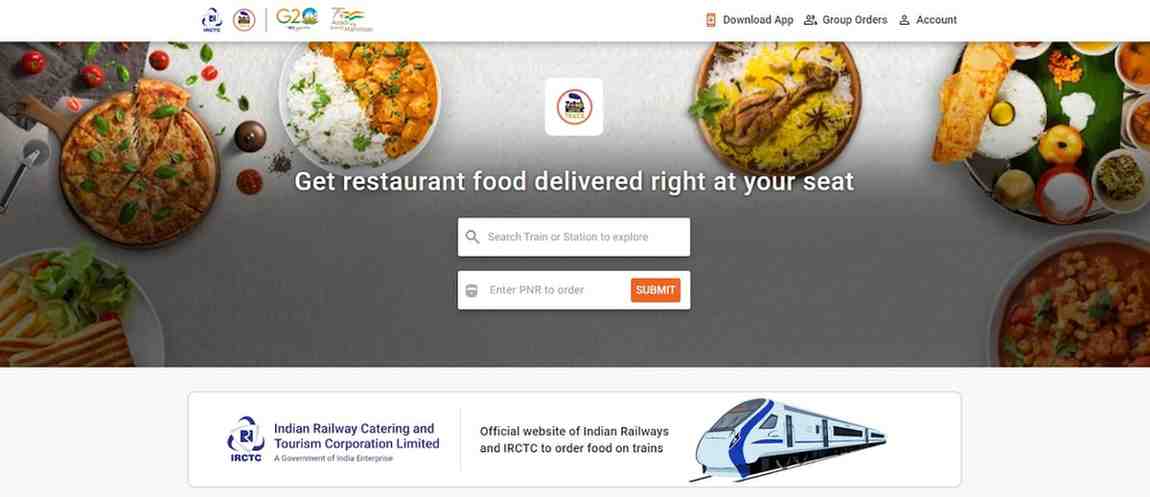
- Enter PNR Number: Once you are on the eCatering page, you need to enter the PNR number in the provided dialogue box and click on the “Submit” button. This will give the list of upcoming stations and restaurants available at them.
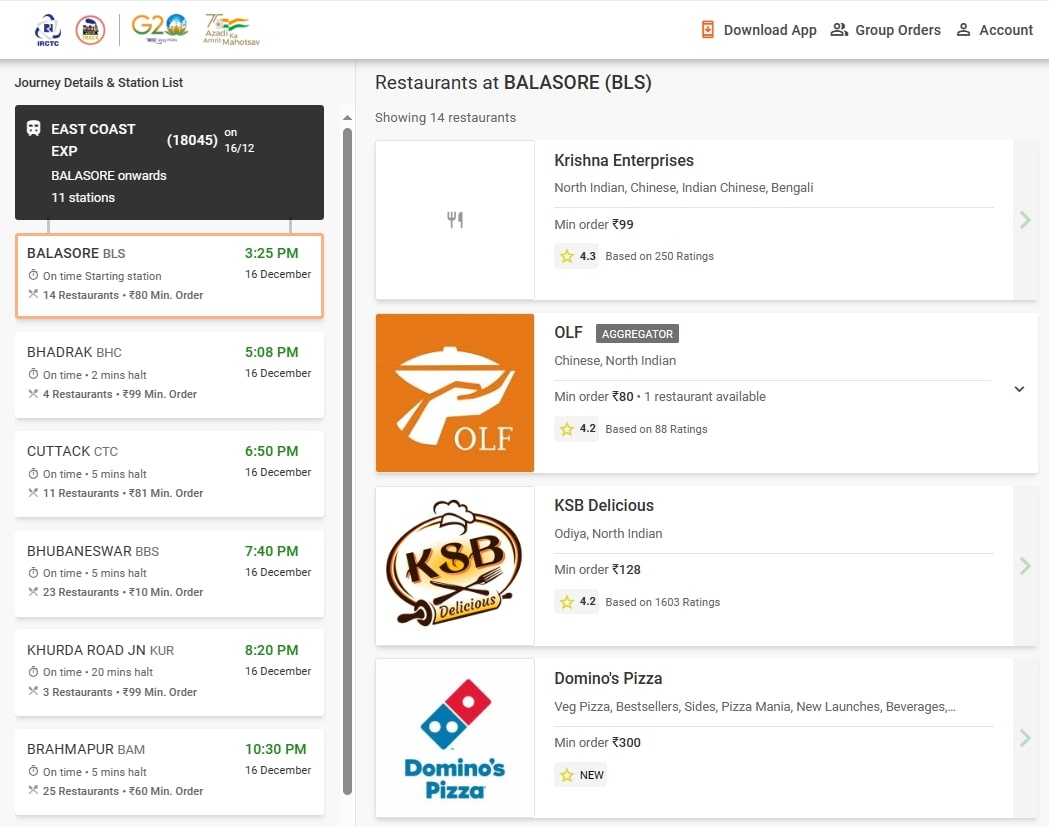
- Select Domino’s and Pizza Options: After that, you need to select Domino’s from the provided list and choose your favorite option from its menu.
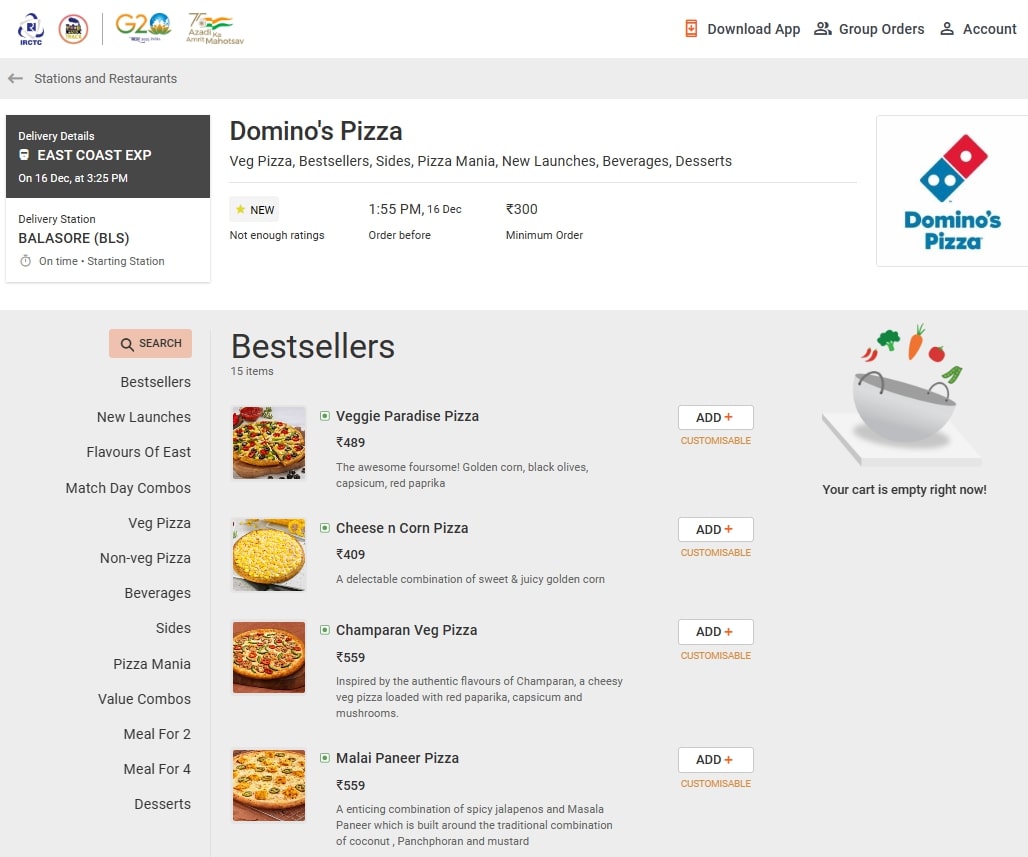
- Make Your Payment: After adding the selected pizzas to the cart, you need to make the payment. But you need to know that there is a minimum order amount of ₹300 on the brand. There are multiple payment options; you can pay in advance or opt for cash on delivery.
How to Order Domino’s Pizza on Train Via Domino’s App
Domino’s has come up with various methods in recent years to reach every pizza lover in India. One of the most important ones is collaborating with IRCTC to enable pizza delivery on trains. Please follow the below-mentioned steps to order from its app.
- Download the Domino’s App: To get started, you’ll need to have the Domino’s app installed on your smartphone. You can download it from the App Store or the Google Play Store and log in to the account with essential credentials.
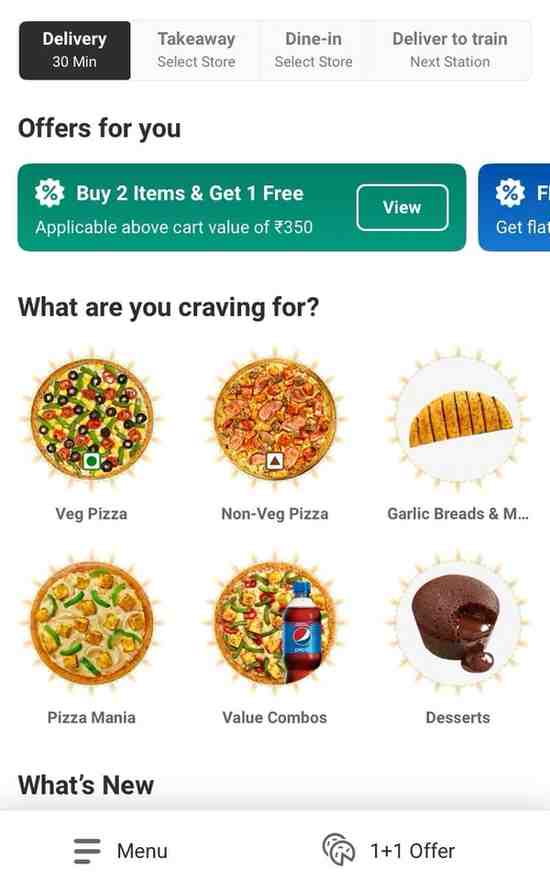
- Select the ‘Deliver to Train’ Option: Post logging in and you can select the ‘Deliver to Train’ option available on the right corner of the app. This mode is specially designed for train travelers and allows you to order Domino’s pizza during your train journey.
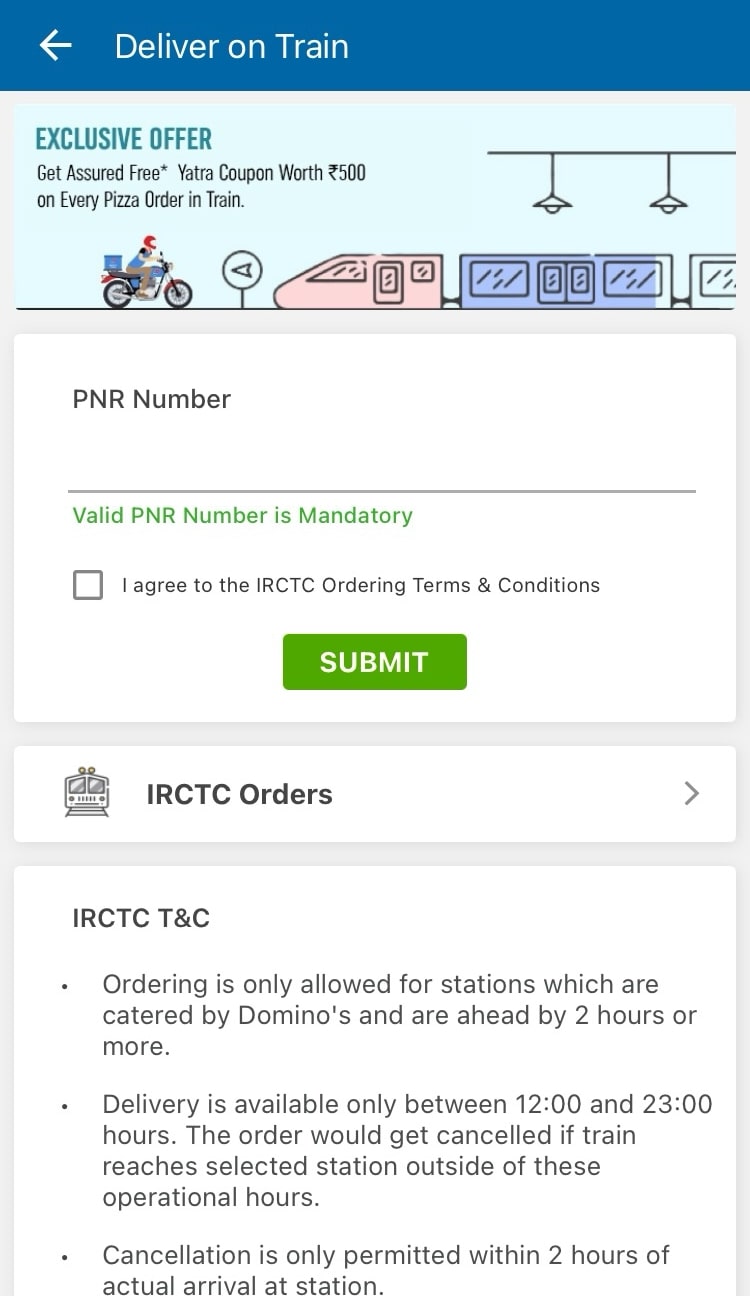
- Enter PNR Number: Once you’re in ‘On-The-Go’ mode, you’ll need to enter your PNR number. This will help the brand to locate your seat and berth to make delivery effectively.
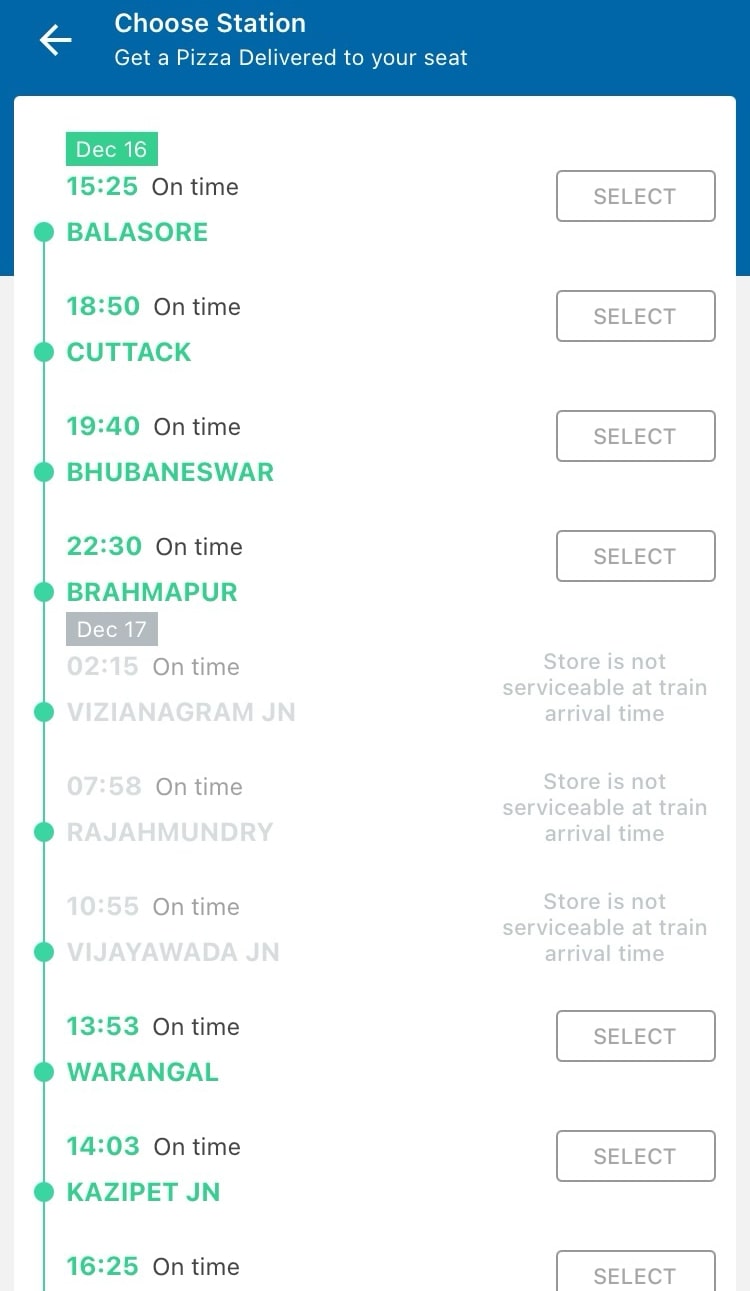
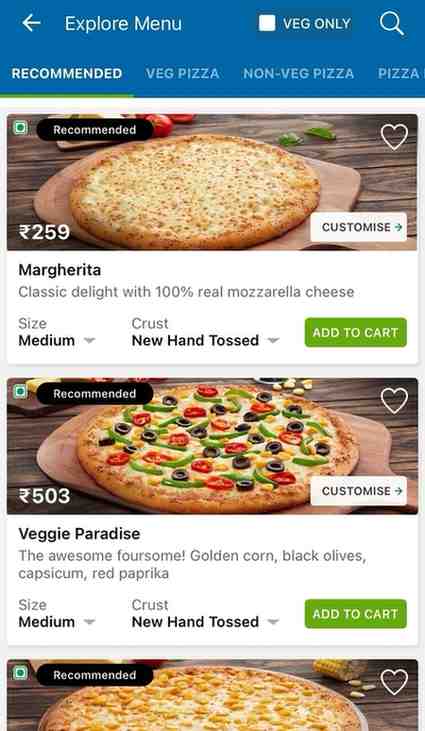
- Select Station and Pizza Options: After the PNR detail is fetched, you need to select your upcoming stations and choose pizzas from the menu. Then, you need to add them to the cart and proceed with payment.
- Checkout and Payment: Once you are on the checkout page, you have to option to add add-ons, like cold drinks, etc. Post that, you are required to provide your contact details for the brand to reach out to you before delivering the order. After this, you can pay using various payment methods, such as credit/debit cards, digital wallets, or cash on delivery (if available on your train). Along with the available payment options, you can also use various Domino’s coupon codes to treat yourself to numerous exclusive discounts.
Terms and Conditions on Domino’s Pizza Train Delivery
A few things to keep in mind before you place your order:
- Advance ordering. Place your order at least 2 hours before your train reaches the delivery station, so Domino’s has time to prepare your pizza and coordinate delivery.
- Service availability. Delivery is only available at stations served by Domino’s, so check whether your station is covered before ordering.
- Delivery window. Orders can be placed for delivery between 12:00 hours and 23:00 hours.
- Payment options. You can pay online using a credit or debit card, UPI, or net banking, or choose cash on delivery if it’s available at your station. If you’re paying online, picking the right credit card for online shopping can also help you stack extra savings on top of any Domino’s offers.
- Cancellation policy. Orders can be cancelled up to 2 hours before your train reaches the designated station.
Wrapping Up
Ordering Domino’s on a train is a convenient way to enjoy a hot meal without waiting until you reach your destination. Whether you order through the Domino’s app, IRCTC, or Food on Track, the process is simple and takes only a few minutes. Just make sure your train passes through a supported station and place your order in advance. With the right timing, you can enjoy your favourite pizza delivered straight to your seat during the journey.
FAQs
Can I order Domino’s pizza on a train in India?
Yes, you can order Domino’s pizza on Indian trains using the IRCTC eCatering website, the “Food on Track” app, or the Domino’s mobile app. Your order gets delivered directly to your seat at selected stations.
What information is needed to place a Domino’s train order?
You need a valid 10-digit IRCTC PNR number, your train name or number, coach and seat details, and a contact mobile number. This ensures smooth, accurate delivery straight to your berth during the journey.
How early should I order Domino’s pizza before my train arrives?
You must place your Domino’s order at least 2 hours before your train reaches the target station. Booking gives the outlet adequate time to freshly bake and deliver your hot pizza on time.
How to order Domino’s pizza on the train using PNR number?
Open the IRCTC “Food on Track” app or Domino’s app, enter your 10-digit PNR, choose an upcoming delivery station, select Domino’s from available outlets, pick your favorite items, and complete the payment.
What are the operational hours for Domino’s train delivery?
Domino’s train delivery typically operates between 12:00 PM and 11:00 PM (12:00 to 23:00 hours). Orders placed for station arrivals outside these standard operating hours will not be fulfilled or processed by the system.
Is the “30 Minutes or Free” delivery guarantee applicable on train orders?
No, Domino’s 30-minute delivery guarantee does not apply to train orders. Due to train scheduling, station dwell times, and rail security protocols, deliveries are coordinated specifically to align with your train’s actual arrival time.
Can I cancel my Domino’s train order if the train is running late?
Yes, you can cancel your train pizza order at least 2 hours before the scheduled arrival at the chosen station. However, cancellations are generally not allowed once the 2-hour window before arrival begins.
Can I pay Cash on Delivery for Domino’s pizza on a train?
Yes, Cash on Delivery (COD) is available at select stations, alongside online payment options like UPI, net banking, and credit or debit cards. Carrying exact change is recommended for quick delivery at your berth.
What happens if my train gets delayed or arrives late at the station?
IRCTC eCatering tracks real-time train status. If your train is delayed, the delivery team adjusts preparation and dispatch accordingly. If the delay falls outside operational hours, your order may be automatically canceled and refunded.