
| Quick answer: Choose Google Workspace for browser-based work, real-time collaboration, and simple cloud management. Choose Microsoft 365 if your business depends on Excel, Outlook, Teams, or desktop Office apps. In India, plans start at ₹136/user/month for Workspace and ₹170/user/month for Microsoft 365. |
Choosing between Google Workspace and Microsoft 365 is less about which suite has more features and more about how your team works. EY found that 88% of employees in India use AI at work, with 37% using it daily, making AI capabilities an increasingly relevant factor when choosing a productivity suite.
Both suites bring together email, cloud storage, office apps, video meetings, and collaboration tools, and both now include AI features. This guide compares their pricing, features, AI tools, security, and ease of use to help you choose the right fit for your business.
Comparing Google Workspace & Microsoft 365
Before we get into the details, it helps to see how the two suites compare at a glance. They solve similar problems but take very different approaches, so a quick side-by-side view makes the differences easier to understand.
| Factor | Google Workspace | Microsoft 365 |
| Type of Suite | 100% cloud-based suite | Cloud + desktop hybrid suite |
| Email Service | Gmail with integrated Drive + Chat | Outlook with Exchange |
| Storage | 30 GB to unlimited, depending on plan | 1 TB OneDrive storage across most plans |
| India Pricing | Starts at ₹136 per user per month (excluding GST) (Business Starter, annual billing) | Starts at ₹170 per user per month (excluding GST) (Business Basic) |
| Collaboration | Real-time co-editing across Docs, Sheets and Slides | Real-time co-authoring in online Word/Excel/PowerPoint |
| Video Meetings | Google Meet included in all plans | Microsoft Teams included in all plans |
| Offline Access | Available through Drive offline mode and app installs | Full offline use through desktop apps like Word, Excel and PowerPoint |
| File Compatibility | Native Google Formats, exports to MS Office formats | Native Office formats. Strongest Excel and PowerPoint compatibility |
| Integrations | Google Workspace Marketplace with thousands of add-ons | Deep integration with Windows, Azure, Teams and Office ecosystem |
| Security | Zero-trust model, strong phishing protection, 2-step verification | Advanced threat protection, endpoint management and compliance tools |
| Built-in AI | Gemini bundled into Business and Enterprise plans at no extra cost | Copilot bundled into Business Standard and Business Premium. Not available on Basic. |
| Free trial | Yes, 14-day free trial | Yes, one month free trial |
| Best For | Teams that want simple collaboration, clean UI and browser-first workflows | Teams that need powerful desktop apps, stronger Excel usage and enterprise controls |
If pricing is a key factor for your team, check out the latest Google Workspace coupons and Microsoft 365 offers to see where you can save.
Google Workspace vs Microsoft 365: What Each Cloud-Based Suite Offers
Google Workspace and Microsoft 365 are the two most widely used productivity suites in the world. According to Statista, Google Workspace holds 45% of the global market share in office productivity software, while Microsoft has 29%, with others at 26%. Together, they dominate approximately 74% to 96% of the market, depending on the metric, far ahead of competitors like Zoho or Adobe.
Google Workspace
Google Workspace is built for teams that want fast, intuitive collaboration without the complexity of software setups. Everything runs smoothly in the browser, eliminating the need for installations or device-intensive systems. Gmail stays at the center of communication, backed by Drive for cloud storage and Docs, Sheets and Slides for real-time work.
Workspace works especially well for:
- Remote and hybrid teams
- Agencies and creative departments
- Startups that want tools that “just work.”
- Teams that switch devices often
What Makes Google Workspace Stand Out
- Effortless collaboration
Multiple people can edit the same file in real time without worrying about version conflicts.
- Simple onboarding
New users pick it up quickly. No training sessions or IT-heavy setups.
- Strong browser experience
Everything loads quickly, runs smoothly across devices and avoids software or compatibility issues.
- Cleaner communication workflows
Gmail, Calendar, Chat and Meet work together smoothly, which makes day-to-day communication easy to manage.
- Gemini included at no extra cost
Google includes Gemini AI in Workspace Business and Enterprise plans at no extra cost, with features for Docs, Gmail, and Meet.
Microsoft 365
Microsoft 365 is a better fit for teams that deal with large files or detailed work. Word, Excel and PowerPoint still run circles around most cloud-only editors when it comes to big spreadsheets or long documents.
Microsoft 365 works well for:
- Enterprises and large organizations
- Teams that work with heavy files or complex data
- Finance, legal, consulting and analytics teams
- Companies that need strong device and identity management
What Makes Microsoft 365 Stand Out
- Unmatched desktop applications
Word and Excel stay ahead in formatting, macros, data analysis and offline performance.
- Enterprise-grade security
Built-in threat protection, device controls, compliance frameworks and endpoint management.
- Structured communication with Teams
Teams serves as a full collaboration hub for calls, chat, file sharing and project organization.
- Better offline flexibility
Work continues smoothly without internet because the apps store versions locally.
- Copilot included (only for higher-priced bundles)
Microsoft raised prices for several business plans from July 2026, while its higher-priced plans now offer bundled Copilot options.
Key Factors to Help You Choose Between Google Workspace and Microsoft 365
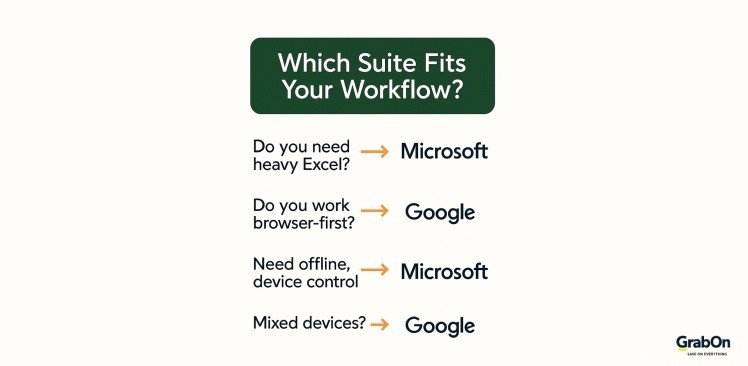
Picking the right suite isn’t only about comparing features. It comes down to how your team actually works day to day – the devices you use, the tools you depend on and the kind of workflow you want to support. Here are the things businesses pay attention to when they’re deciding between the two.
-
Ease of Setup and Onboarding
Teams tend to underestimate how much time goes into rolling out a new suite. Google Workspace is quicker to set up and easier for new users to understand, which helps smaller teams and fast-moving companies get started without support. Microsoft 365 takes more effort to configure, especially if you plan to use desktop apps, device controls or advanced permissions, but the setup pays off for teams that want more structure.
Since 94% of enterprises now use some form of cloud service, companies also expect faster onboarding and less backend hassle when adopting new tools.
| Tip: If you want the simplest setup with the least IT effort, Workspace is the easier start. |
-
Migration Difficulty
Workspace migrations usually go faster for teams with simple, cloud-based workflows, while Microsoft gives you more control if your setup is more detailed or regulated. For a 50-person company in India, switching from Microsoft 365 Business Standard to Google Workspace Standard, or the other way around, can cost around ₹2.5 lakh to ₹6 lakh once you factor in migration, training, partner fees, and downtime. The license cost is usually only part of the total.
| Tip: The easiest way to avoid a messy migration is to map your current storage setup. If your files are local, budget extra time. If they’re already in the cloud, expect a cleaner transition. |
-
Device Compatibility and Performance
Your choice also depends on the devices your team uses. Workspace runs well on virtually any machine and is especially smooth on older laptops because everything loads in the browser. Microsoft 365 performs best on Windows devices and gives you more power when you install the desktop apps. Teams that rely on mobile work usually tend to find Workspace lighter to deal with.
Since Windows holds more than 72% of the global desktop market share, it’s no surprise that many companies naturally lean toward Microsoft for compatibility. If new Windows laptops are part of the upgrade, Lenovo Pro for Business is worth a look for its additional discounts and benefits.
| Tip: If your team uses a mix of devices or older hardware, Workspace is easier to maintain. |
-
Scalability as Your Team Grows
The suite you choose should support your next stage of growth. Workspace scales smoothly because everything lives in the same cloud environment. Microsoft 365 scales deeper with admin controls, policies and structured storage that help larger companies organize their teams more effectively.
For example, organizations that grow past 100-150 people often find Microsoft’s permission controls more helpful than Workspace’s simpler folder sharing.
| Tip: If you expect layered departments or rapid hiring, Microsoft gives you more control. |
-
Integration with Existing Tools
Many companies choose a suite based on the tools they already depend on. Workspace integrates smoothly with popular web apps and modern SaaS tools, which matters more today because about 73% of businesses now rely on SaaS apps as part of their daily workflow.
Microsoft 365, on the other hand, fits naturally for teams using Windows, Azure, Power BI or Dynamics since everything is designed to work together and share data across the ecosystem.
| Tip: Think about future tools too. If you plan to adopt BI tools, automation platforms or CRM systems later, choose the suite that aligns with that roadmap, not just your current stack. |
-
Real Total Cost of Ownership
The monthly subscription is only part of the story. Hardware, training time, admin work and downtime all contribute to cost. Workspace keeps ongoing costs low because it needs minimal maintenance. Microsoft can be more expensive to run, but the desktop apps and ecosystem benefits tend to reduce the number of extra tools teams pay for.
For instance, a lot of companies eliminate third-party reporting or dashboard tools after moving to Microsoft because they can use Power BI instead.
| Tip: Look beyond the monthly price and calculate how much time your team spends managing tools. |
-
Long-Term Flexibility and AI Features
Teams everywhere are now thinking about automation and AI. Workspace offers simple, lightweight AI tools inside Docs, Sheets and Gmail. With the current bundling, Gemini is included with most Business and Enterprise plans, giving Google Workspace an edge on AI value compared with Microsoft 365. Microsoft 365 goes deeper with Copilot, which pulls context from emails, documents and enterprise data to automate heavier tasks.
Microsoft’s Work Trend Index also found that 70% of workers want AI to help reduce repetitive tasks to lessen their workloads, which is why these tools are becoming a real decision factor. Since the July 2026 update, Copilot is included with Business Standard and Premium plans, making Business Standard the starting point for Microsoft 365 users who want Copilot.
AI Features Comparison
| Category | Google Workspace (Gemini) | Microsoft 365 AI (Copilot) |
| Writing help | Drafts and rewrites in Docs and Gmail | Generates and rewrites documents in Word and PowerPoint |
| Email assistance | Summaries + drafts in Gmail | Summaries + structured replies in Outlook |
| Data & spreadsheets | Basic analysis and suggestions in Sheets | Advanced Excel analysis, formulas & insights |
| Document insights | Summaries across Docs, Sheets & Drive files | Pulls context from Word, Excel, Outlook, Teams |
| Meetings | Notes and summaries in Meet (Gemini for Workspace) | Meeting summaries, action items in Teams |
| Cost in India | Included in most Business and Enterprise plans | Included in Business Standard (₹1,955) and Business Premium (₹2,660) |
Google Workspace: Pros and Cons
Here’s a closer look at where Google Workspace shines and where it may fall short for different teams.
| Pros | Cons |
|
|
|
|
|
|
|
|
|
|
Microsoft 365: Pros and Cons
Here’s how Microsoft 365 stacks up in terms of everyday strengths and possible drawbacks.
| Pros | Cons |
|
|
|
|
|
|
|
|
|
|
Google Workspace vs Microsoft 365: Which Should You Choose?
Choosing between Google Workspace and Microsoft 365 really depends on how your team works day to day. If you want simple tools that help your team collaborate quickly, Google Workspace is usually the better fit. It keeps things light, works smoothly across devices and is ideal for startups, creative teams, agencies and businesses that spend most of their time in the cloud.
If your work depends on large spreadsheets, detailed documents, offline access or stronger security controls, Microsoft 365 will serve you better. It offers deeper features, more power for data-heavy tasks and the kind of structure larger organizations rely on.
Which Suite Fits Which Team Type
| Team Type | Best Fit | Why It Works |
| Small businesses | Google Workspace | Easy setup, predictable costs, simple tools |
| Creative teams | Google Workspace | Seamless collaboration, lighter apps |
| Data-heavy teams | Microsoft 365 | Excel power, offline work & advanced tools |
| Large enterprises | Microsoft 365 | Deep controls, compliance, security |
| Remote/hybrid teams | Google Workspace | Smooth browser-based workflows |
| IT-heavy setups | Microsoft 365 | Identity management, device controls |
| Legal/finance/consulting | Microsoft 365 | Excel modeling, macros, compliance controls |
| Content marketing/PR | Google Workspace | Faster review cycles, real-time co-editing |
| Regulated industries (healthcare, BFSI) | Microsoft 365 | Endpoint management, audit trails, DLP |
No matter which suite feels right for your workflow, you can always make it more affordable with the latest software deals and AI tool discounts available on GrabOn. A quick look at the offers before you sign up can help you save more and get better value from either platform.
Tips to Save More on Google Workspace and Microsoft 365 in India
- Choose annual billing if your team is stable: Annual commitments can cost less than paying monthly. Google Workspace, for example, advertises savings of up to 16% on annual plans.
- Check for current promotions: Before signing up or renewing, check for active discounts, introductory offers and promo codes. New customers may get better deals than existing subscribers.
- Pick the right plan: Don’t pay for storage, security or AI features your team won’t use. Compare the plans based on what your business actually needs.
- Review your licenses: Remove unused accounts and check whether every employee needs the same plan. Cutting even a few unnecessary licenses can reduce your yearly bill.
- Factor in AI costs: If your team needs Gemini or Copilot, compare the total plan price with AI included, rather than comparing the base subscription prices alone.
- Check pricing before renewal: Microsoft 365’s business pricing changed in July 2026, so check the current rate before your next renewal instead of assuming your existing price will stay the same.
- Consider switching costs: If you’re moving from one suite to the other, include migration, training, and setup costs in your calculation. A lower subscription price may not mean a cheaper switch overall.
FAQs
What is the main difference between Google Workspace and Microsoft 365?
Google Workspace is a cloud-first suite built for real-time collaboration in Docs, Sheets and Gmail. Microsoft 365 blends cloud apps with powerful desktop software like Word, Excel, Outlook and Teams, which gives you more advanced features and stronger offline use.
Which is better for small businesses: Google Workspace or Microsoft 365?
Google Workspace is usually better for small businesses that want a simple setup, easy collaboration and tools that run smoothly in the browser. It keeps costs predictable and is easy to manage without a dedicated IT team.
Which is better for collaboration: Google Workspace or Microsoft 365?
Google Workspace is better for real-time collaboration because Docs and Sheets let multiple people edit together without setup. Microsoft 365 also supports collaboration, but it works best when files are stored in OneDrive or SharePoint, which makes it more document-centric than free-flowing.
Is Google Workspace or Microsoft 365 cheaper?
Google Workspace starts at a lower price, making it more affordable for smaller teams. Microsoft 365 costs more but includes full desktop apps and 1 TB storage, which can offer better long-term value depending on your workflow.
Which is more secure: Google Workspace or Microsoft 365?
Both are secure. Google offers strong, simple protection with minimal setup. Microsoft gives deeper admin controls, compliance features and device management for companies with stricter security needs.
Can I use Google Workspace and Microsoft 365 together?
Yes. Businesses can use both, such as Google Workspace for Gmail and collaboration while keeping Microsoft apps such as Excel for teams that need them. The trade-off is higher license costs and more administration, so using both makes sense only when specific workflows require it.
Can I use my existing email domain with Google Workspace or Microsoft 365?
Yes. Both let businesses use a custom email address such as name@yourcompany.com. You’ll need to verify your domain and update its DNS records during setup. Plan the switch carefully if you’re moving an existing email service to avoid disruption.
Does Google Workspace work offline?
Yes. Google Docs, Sheets and Slides can be used offline in Chrome or Microsoft Edge after offline access is enabled. Gmail also supports offline use. Some features still require an internet connection, so Microsoft 365 has an advantage for teams that rely heavily on full desktop applications.
Is Microsoft 365 the same as Office 365?
Microsoft 365 is the newer name for Microsoft’s broader productivity subscription. It includes familiar Office apps such as Word, Excel and PowerPoint alongside services such as OneDrive, Teams and Microsoft security and management tools, depending on the plan.
Which is better for Excel: Google Workspace or Microsoft 365?
Microsoft 365 is the better choice for advanced Excel work. Google Sheets is more than capable for everyday spreadsheets and collaboration, but Excel is stronger for complex models, macros, Power Query and other advanced workflows.
How long does it take to switch from Google Workspace to Microsoft 365, or vice versa?
It depends on the size and complexity of the business. Email and basic files are relatively straightforward to migrate, while shared drives, SharePoint sites, permissions and large amounts of data can make the process more involved. Google provides migration tools for moving data from Microsoft services such as Exchange, SharePoint and OneDrive.
What happens to my data if I cancel Google Workspace or Microsoft 365?
Don’t cancel before exporting or migrating important data. Both platforms provide ways to export business data, but the exact retention and deletion periods depend on the service and account type. Google, for example, lets administrators export or migrate organizational data before leaving the service.